Cameras become your AI's eyes, in real time.
Video AI watches every camera stream as it happens, on your own GPUs, and spots people, vehicles, objects and anything unusual. It joins what it sees with your other sources in Aleria, from sensors and access logs to the systems you already connect. The right person gets a task with what happened, where and when, instead of footage to scroll through.
- RTSP · ONVIF
- the camera standards it takes
- 0 streams
- leave your camera network, only events do
- Your GPUs
- at the edge or in your data center
- Plain words
- to say what it should watch for
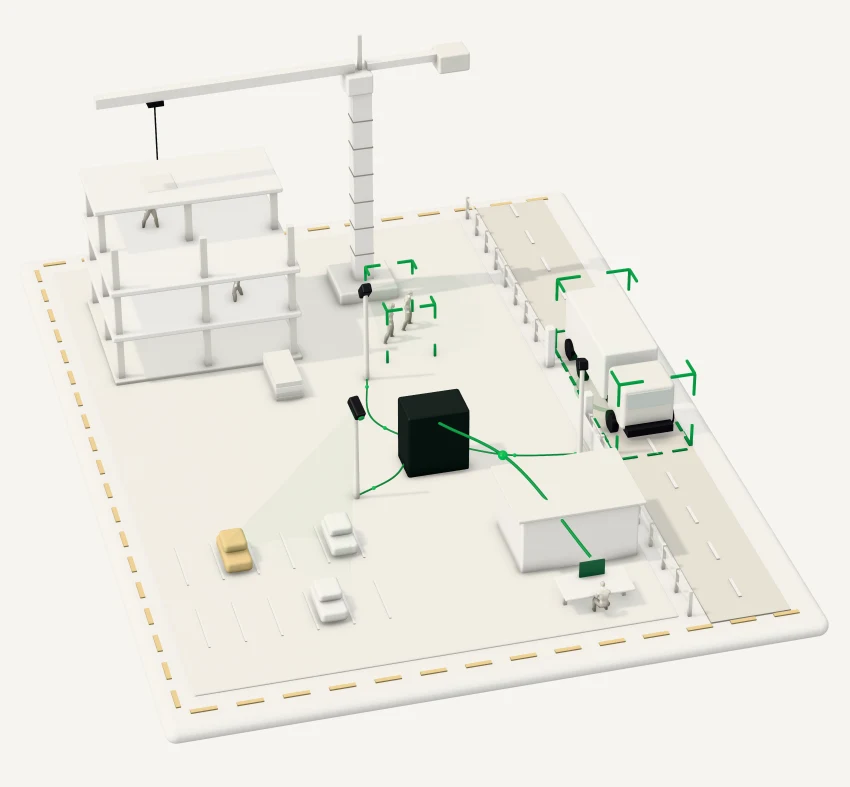
A site supervisor gets a task, not a screen to watch.
Omar runs a construction site with cameras at every gate and crane. Nobody on his team has time to watch them.
At 08:12, Video AI sees two workers near the crane without high-visibility vests, and the safety officer gets an alert with the clip and the place. At 08:41, a truck has blocked gate 3 for six minutes, and Omar gets a task in Aleria OS.
The next morning's brief already says how full the car park was. Nobody had to sit in front of the screens.
- 07:30Car park 84% full · camera 11
- 07:30Added to the morning brief
- 08:12Two workers without vests near the crane · camera 3
- 08:12Alert to the safety officer · acknowledged
- 08:41Gate 3 blocked by a truck for 6 minutes · camera 7
- 08:41Task for the site supervisor · created
How it works, in four steps.
- Connect the cameras
Video AI takes any camera that streams over RTSP or ONVIF, the video standards most IP cameras use. It watches many streams at once, from one site or many.
- Say what matters
Describe in plain words what to watch for, such as a gate kept clear, safety gear near machines, how full a space is, or a vehicle where it should not be.
- Let it watch
Video AI runs on your GPUs, at the edge or in your data center, and spots people, vehicles, objects, movements and anything out of the ordinary as it happens.
- Act on events
Each event says what happened, where, when and why it matters. It can alert a person, open a task or start an automation, and it lands on a map and a timeline you can search later.
What stays in your hands.
- Where video is processed
- On your GPUs, at the edge or in your data center.
- What leaves the cameras
- Only events leave, each with the short clip that explains it. The streams stay on your camera network.
- What it watches for
- The rules you write, camera by camera and zone by zone.
- Who acts on an event
- You choose who is alerted and what starts. Anything that leaves your organization waits for a person to approve it.
- How long anything is kept
- You set the retention for events and clips.
- Who sees what
- Each person sees the cameras and events their role allows.
Where teams use it.
- Building sites
- Safety gear near machines, people where they should not be, blocked gates and access roads.
- Security
- Unauthorized access, unusual movement after hours, a perimeter crossed.
- City operations
- Traffic, crowds and incidents across many cameras, on one map.
- Retail and venues
- How full a space is, queues, and how people move through it.
- Telecom and utilities
- Data centers, exchange points and shops watched from one place.
- Compliance
- A searchable record of safety events, with times and clips, for audits.
Questions customers ask first.
Does footage leave our site?
No. Video AI runs at the edge or in your data center. Events, not footage, go to Aleria OS, and you set the retention.
Which cameras does it work with?
Any camera that streams over RTSP or ONVIF.
What can it detect?
People and safety gear, vehicles, objects, movements, zones, occupancy and behavior out of the ordinary, with rules you define in plain words.
Who acts on an event?
You decide. An event can notify a person, open a task or start an automation, and anything that leaves your organization waits for approval.